
UK · Payroll & compliance
Brightpay Review
BrightPay is the cheapest HMRC-recognised specialist tool for UK accountants and bureaus in 2026, after Bright retires the desktop product and shifts everyone to Cloud.
The desktop version that won BrightPay most of its customer base is being retired at the start of the 2026/27 tax year.
Every remaining user must move to the cloud product, and the pricing model changes with them.
That transition is manageable for most buyers. But it introduces migration timing, feature parity questions, and a pricing structure that is genuinely harder to compare than the old flat annual licence.
If you are evaluating BrightPay now, whether as a first-time buyer or a desktop user deciding whether to stay, this review addresses what the product page does not.
Should you choose BrightPay?
Pricing and features reviewed April 2026
What is BrightPay?
BrightPay is UK payroll software built by Bright (formerly Thesaurus Software), an Irish fintech company founded in 1992.
The BrightPay product launched in 2012 as a UK-specific payroll tool and has become one of the most widely used HMRC-recognised payroll packages in the country, with particular traction among accountancy practices and payroll bureaus.
For most of its life, BrightPay was a desktop application: you downloaded it annually, installed it on one or more machines, and processed payroll locally. That architecture is now being retired. From the 2026/27 tax year, BrightPay operates exclusively in the cloud.
The desktop version will not receive compliance updates, which means it cannot be used for legally compliant UK payroll from April 2026 onwards.
The cloud product, soft-launched in 2023 and progressively developed to match desktop feature parity, runs in a browser, supports multi-user access, and integrates with the employee self-service portal (previously the BrightPay Connect add-on).
If you are evaluating BrightPay today, you are evaluating the cloud product. The desktop era is over.
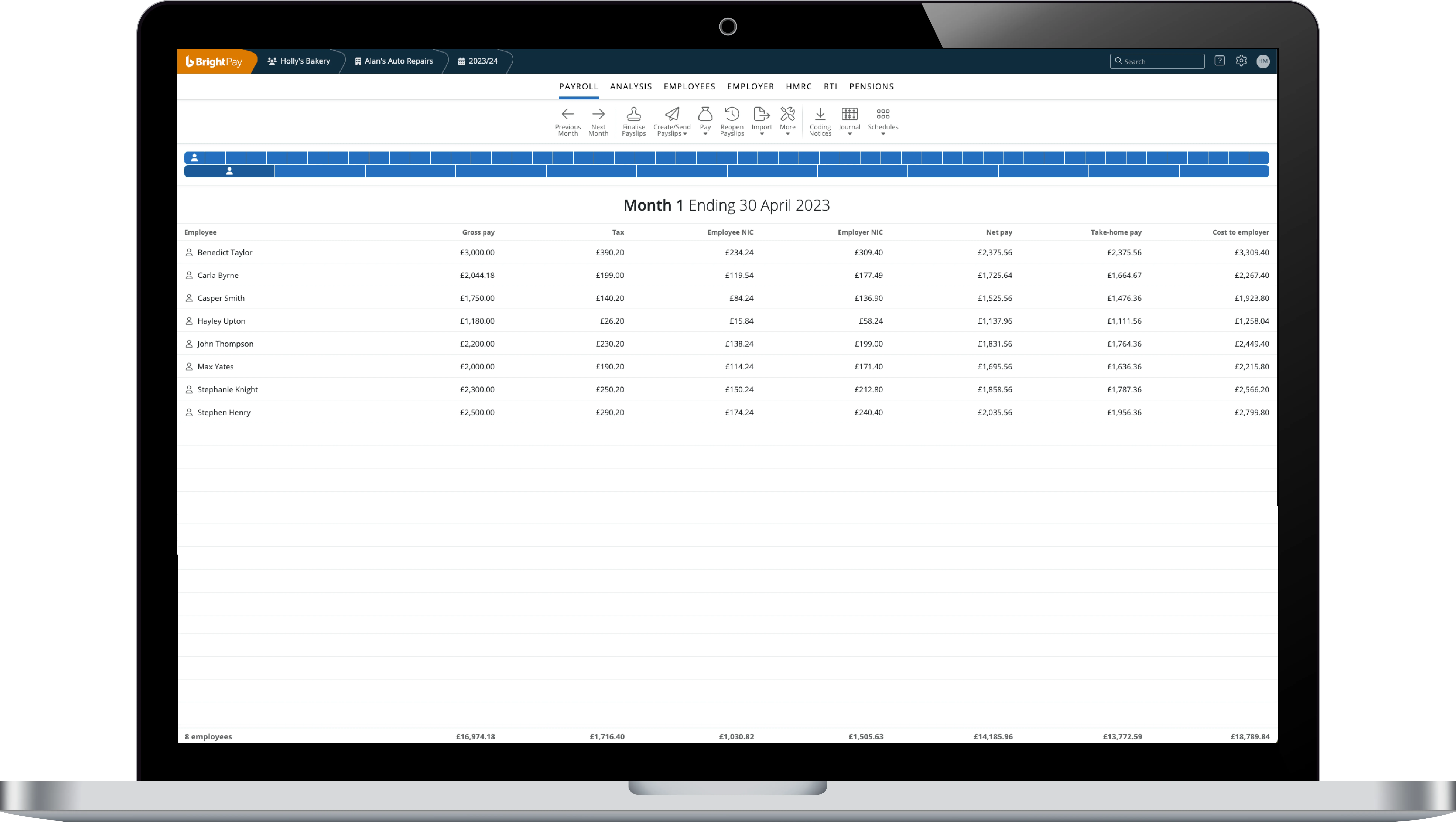
Who is BrightPay best for?
BrightPay works best for two distinct buyer types, and the fit is quite specific for each.
Accountancy practices and payroll bureaus running multiple client payrolls are BrightPay’s strongest use case. The bureau licence includes unlimited employers and unlimited employees at a flat rate, a pricing structure that Sage and Xero do not match.
If you are processing payroll for 30 clients, the economics are significantly different from any per-client or per-employee alternative.
No comparable per-client efficiency exists elsewhere in the HMRC-recognised software market.
SMB employers with 1 to 50 employees who want reliable HMRC compliance, strong auto-enrolment workflows, and the lowest per-employee cost in the market. BrightPay’s desktop pricing started at £79/year for up to 3 employees, well below Sage’s monthly subscription model.
The cloud pricing structure has not yet published equivalent flat figures, which means you need to use the pricing calculator to verify current rates.
If you need HR functionality alongside payroll (absence management, performance reviews, expenses), BrightPay is not the answer. It is a payroll-only tool, and that scope is its strength and its limit.
Who should avoid BrightPay?
Several buyer types will hit the ceiling quickly.
If you want a fully integrated HR and payroll platform, BrightPay does not offer it. There is no native absence tracker, no performance review module, no expenses management. You will need a separate HR tool or a different platform altogether.
If your organisation has data residency requirements, or your procurement team asks about data hosting jurisdiction, Bright’s Irish ownership and Microsoft Azure hosting means your payroll data sits on infrastructure managed by an Irish entity.
Most UK buyers find this acceptable under GDPR, but some procurement or compliance functions flag it as a review point.
If your procurement team is the type that asks where data sits, raise it early: it rarely blocks a deal, but discovering it after sign-off can stall a rollout for weeks.
If you use the Construction Industry Scheme extensively, verify that CIS functionality is fully live in the cloud product before committing.
BrightPay confirmed CIS would be available in cloud by April 2026, but early cloud adopters were required to maintain a parallel desktop licence to handle CIS filings while the feature was built out.
Check the current status directly with BrightPay before your renewal date.
BrightPay pricing
BrightPay’s pricing has undergone a structural change as the product moved to cloud. The old model was simple: pay once per tax year for a desktop licence based on employee count.
The new model is subscription-based, calculated on your highest recorded employer and employee count within any given billing period.
Desktop pricing (2025/26, final year)
The 2025/26 tax year is the last in which desktop licences are available. Prices exclude VAT:
| Employee count | Annual licence (ex. VAT) |
|---|---|
| Up to 3 employees | £79 |
| Up to 10 employees | £139 |
| Up to 25 employees | £209 |
| Unlimited employees | £289 |
Source: BrightPay.co.uk pricing page, verified April 2026. 2025/26 tax year. Prices exclude VAT.
Cloud pricing (from 2026/27)
From April 2026, BrightPay operates exclusively on cloud pricing. The published model charges based on your highest recorded employer and employee count within the billing period, with annual and monthly payment options. Annual payment attracts a discount over monthly billing.
BrightPay does not publish a simple tier table for cloud pricing. You must use the interactive calculator on their pricing page. This is a real friction point if you are trying to benchmark BrightPay against Sage or Xero in a Finance conversation.
The “highest recorded employee count” billing model also means a short-term spike in headcount (a temporary seasonal hire, for example) can push you into a higher billing tier for that period.
BrightPay Connect and the employee self-service add-on
BrightPay Connect (the cloud backup and employee self-service portal) was historically an add-on priced separately from the desktop licence.
Connect pricing was employee-count dependent: £0.60/month for 1 employee, £4.67/month for 10, and £10.52/month for 25, with the per-employee cost falling as headcount rises.
From 2026/27, BrightPay Connect is no longer available as a standalone add-on on the old desktop framework. The cloud product replaces and absorbs this functionality.
If your budget modelling assumed low Connect costs on top of a flat desktop licence, that model no longer applies. Factor the full cloud subscription cost into your comparison.
Is BrightPay affordable?
At the SMB level (1 to 25 employees), the desktop pricing was among the cheapest in the HMRC-recognised market. Cloud pricing is harder to benchmark without running the calculator, but BrightPay has historically priced significantly below Sage Payroll (from £20/month).
Xero Payroll is included within Xero’s higher-tier accounting plans rather than sold standalone.
If price is your primary driver, BrightPay is likely still the most efficient option at this scale, but verify your specific count before assuming it.
Whichapp view
The shift from flat annual licence to “highest recorded count” cloud billing is not just a pricing change. It is a forecasting problem. Under the old model, a firm could budget the year’s payroll software cost in April and not think about it again.
Under the cloud model, a one-month headcount spike (a seasonal hire, a transfer, an error in the employee register) can lift your billing tier. Finance teams who relied on a fixed annual figure will need to track this differently.
The upside is that cloud billing also works in your favour: if headcount falls, your cost should follow. But the downside feels sharper in practice, because spikes tend to be more visible than troughs.
BrightPay features
BrightPay is purpose-built for UK payroll compliance. The feature set reflects that narrowness: deep where it needs to be, absent everywhere else.
HMRC RTI submissions
Real Time Information submissions to HMRC are handled directly within the software. BrightPay generates and sends Full Payment Submissions (FPS) and Employer Payment Summaries (EPS) without requiring a third-party bridge.
Users reviewing BrightPay on Capterra consistently cite RTI reliability as a strength, which matters if you have ever dealt with the operational fallout of a failed submission on a payday Friday.
Auto-enrolment
BrightPay automates the auto-enrolment pensions workflow more completely than most comparably priced tools. Eligibility tracking, contribution calculations, employee category assignments, and re-enrolment triggers are all handled within the software.
The integration with pension providers including NEST, The People’s Pension, and Smart Pension is direct: contribution and enrolment files go straight to the pension provider portal without a manual export step.
When you are running 50 client payrolls, manual auto-enrolment tracking stops being an inconvenience and becomes a compliance risk: one missed re-enrolment date is a Pensions Regulator problem, not a tidy-up task.
Employee self-service
The employee portal (formerly BrightPay Connect, now integrated in the cloud product) allows employees to access payslips, request annual leave, and update personal details. The employer dashboard gives you a consolidated view of leave requests and pending approvals.
This is functional rather than impressive. It covers the basics, but it does not compete with dedicated HR platforms on employee experience.

CIS support
Construction Industry Scheme support was a real gap in early versions of the cloud product. BrightPay committed to full CIS functionality in the cloud by April 2026.
If CIS is central to your payroll processing, confirm this is live and fully tested before you migrate.
The gap caused real disruption for some early cloud adopters who had to run parallel licences during the transition.
Accounting integrations
BrightPay integrates with Xero, Sage, and QuickBooks for journal posting. The Xero integration is cited by reviewers as reliable, but it requires manual export rather than live sync in some configurations.
If automated, real-time journal posting is a firm requirement, Xero Payroll (built within the Xero platform) will be tighter by design.
Is BrightPay trustworthy?
BrightPay has been HMRC-recognised for over a decade and has a long compliance track record in the UK market. No regulatory incidents are on record.
Ownership and data hosting
BrightPay is owned by Bright (formerly Thesaurus Software), an Irish company. The cloud product is hosted on Microsoft Azure, with data encrypted in transit and at rest and automatic backups maintained for audit purposes. For most UK buyers, this is sufficient.
For organisations with specific data residency requirements or government contract frameworks that require UK-only hosting, the Irish ownership and Azure hosting model will need to go through your procurement review process. It will not automatically fail, but it will need to be documented.
Compliance updates
BrightPay has historically been fast with tax year compliance updates. The product for a new tax year has generally been available before April 6. That track record extends to the cloud product.
The risk profile here is that you are now dependent on a cloud vendor’s release cadence rather than your own update timing, which removes one layer of local control. For most buyers this is an acceptable trade-off.
For those in regulated industries with change management requirements, this matters.

BrightPay customer reviews
BrightPay has over 700 verified reviews on Capterra, with 89% of reviewers recommending the software. That is a high satisfaction rate for a product category where competitors like Sage attract more mixed feedback.
What customers like
Value for money appears in more BrightPay reviews than any other factor. Reviewers consistently describe BrightPay as saving them money compared to alternatives, particularly when moving from Sage. Ease of use is cited frequently.
The desktop version was praised for its clean interface, and early cloud reviews suggest the browser-based product maintains that accessibility.
Bureau users highlight the unlimited-employer model as the primary reason they chose BrightPay over any alternative. Multiple reviewers describe it as the only software that made per-client profitability viable for small practices.
Common complaints
Mid-year employer setup receives criticism. Adding a new employer part-way through a tax year, whether because a client joined mid-year or because a business restructured, requires manual adjustments that some reviewers describe as unintuitive.
Reviewers also note that sick leave spanning two tax years requires a manual correction rather than being handled automatically.
Some desktop users have expressed reluctance about the cloud transition, not because the product has deteriorated but because they valued the local control and offline access of the desktop version.
BrightPay’s argument that the cloud product is “almost identical” to desktop is broadly supported by user feedback, but the transition involves renegotiating habits that some bureaus have had for years.
Capterra summary
Across 700+ reviews, BrightPay scores consistently high on value for money and customer support. Negative reviews are relatively rare and tend to focus on specific workflow limitations rather than systemic product failures.
By comparison standards, this is a well-regarded product with genuine user loyalty rather than manufactured review volume, which is to say the headline 89% holds up when you read past the score.
User review data
BrightPay on Capterra (April 2026)
700+ verified reviews. 89% of reviewers would recommend the software. Top-rated dimensions: value for money, ease of use, customer support.
Most common negative theme: mid-year setup complexity and the desktop-to-cloud migration experience, not core payroll reliability.
BrightPay alternatives
BrightPay is the right answer for a specific type of buyer. If you fall outside that profile, these alternatives are worth assessing on their own terms.
If you already use Xero Accounting: Xero Payroll is built natively into the platform and posts journals automatically without export. For firms where payroll-to-accounts reconciliation is a monthly headache, that integration is worth more than the price difference.
Xero Payroll is not available as a standalone product. You pay for the accounting platform regardless.
If you need HR alongside payroll: Sage HR combined with Sage Payroll gives you an integrated platform with absence management, expenses, and performance features.
Sage’s pricing is higher (from £20/month for small employers), but it avoids the cost and integration friction of running BrightPay next to a separate HR tool.
Sage also has a larger UK support operation than Bright, which some buyers value for escalation scenarios.
If you want to avoid cloud migration entirely: Moneysoft remains a desktop-first payroll option with similar pricing to the old BrightPay desktop model. It is a narrower product with less bureau functionality, but if cloud dependency is a concern, it is worth evaluating.
Note that Moneysoft’s own cloud roadmap should be assessed.
No desktop-only product is immune to this industry direction.
For a full comparison across the UK payroll software market, our UK payroll software guide covers eight tools across price, compliance, and accountant support.
Is BrightPay worth it?
For accountancy practices and payroll bureaus: yes, with a caveat about the 2026/27 pricing transition. The bureau licence is still the most cost-efficient model in the HMRC-recognised market.
The cloud product is functionally close to the desktop product most bureaus have used for years. The migration itself is described as straightforward.
BrightPay built a database import tool that reportedly completes the move in minutes.
For SMB employers buying BrightPay for the first time in 2026: the product is worth evaluating, but you should run the cloud pricing calculator before assuming the flat-annual-licence pricing model applies to you.
The economics are still likely to be favourable versus Sage at low to mid employee counts, but the comparison requires actual figures rather than historical desktop pricing.
The one group for whom BrightPay is no longer the obvious choice: existing desktop users who are also considering switching to a more integrated HR-and-payroll platform. The cloud migration is a forcing moment.
If you have been deferring the HR platform question, this is a reasonable time to reassess whether BrightPay’s payroll-only scope still fits your needs.
See our ranked shortlist of providers, scored for HMRC submission reliability, statutory-pay handling, and pricing transparency. Updated for 2026.
View the shortlist →BrightPay FAQs
How much does BrightPay cost?
The 2025/26 desktop licence ranged from £79/year (up to 3 employees) to £289/year (unlimited employees), excluding VAT. From the 2026/27 tax year, BrightPay moves to cloud-only pricing based on your highest recorded employer and employee count.
BrightPay does not publish a flat-rate cloud price table.
You need to use the interactive calculator on their pricing page to get a specific figure. Bureau pricing is also calculator-based and depends on the number of employers and employees you manage.
What are the disadvantages of BrightPay?
BrightPay is payroll-only: no HR module, no expenses, no performance management. The cloud migration is mandatory from April 2026, which changes the pricing model and removes the offline-access option some users preferred.
Cloud pricing is less transparent than the old flat annual model. Mid-year employer setup has been flagged as difficult by multiple reviewers.
And if you are in an organisation with UK-only data residency requirements, the Irish ownership and Azure hosting will need procurement sign-off.
Does BrightPay support Construction Industry Scheme (CIS) payroll?
Yes, but with important caveats about timing. CIS support was missing from early versions of the BrightPay cloud product. BrightPay committed to full CIS functionality in the cloud by April 2026.
Early cloud adopters were given access to a free desktop licence to handle CIS filings during the gap.
If CIS is central to your payroll, verify the cloud CIS feature is fully live before migrating or renewing.
Is BrightPay good for small businesses?
Yes, particularly for businesses with 1 to 25 employees that want reliable HMRC compliance without paying for features they will not use. The desktop pricing was the most affordable in the market at this scale.
The cloud product should remain cost-competitive, but run the pricing calculator to confirm.
BrightPay requires some payroll knowledge to operate confidently; it is not designed for users with no previous payroll experience. If you are a first-time employer who wants hand-held setup, Sage or Xero may offer more accessible onboarding.
Which is better: BrightPay or Sage Payroll?
It depends on what you need alongside payroll. For payroll-only at the lowest cost, BrightPay has historically been cheaper, particularly for bureaus and for employers at low headcounts.
Sage Payroll is more expensive but comes with a larger UK support team, a more established HR integration path (via Sage HR), and a product range that grows with your business.
If you expect to need HR, expenses, or benefit administration within 12 months, the cost of the Sage ecosystem may be justified from day one. If payroll is and will remain your primary need, BrightPay is likely the better-value option.
Is BrightPay being discontinued?
The desktop version of BrightPay is being discontinued. It will not receive compliance updates for the 2026/27 tax year, meaning you cannot legally use it for UK payroll after April 2026. The cloud product is BrightPay’s active, supported version and is not being discontinued.
Bright (BrightPay’s parent company) is investing in the cloud product and expanding its feature set.
This is a platform transition, not a wind-down.
How we reviewed BrightPay
This review drew on the following sources, current as of April 2026:
- BrightPay’s published pricing pages and product documentation
- AccountingWEB’s coverage of the cloud transition announcement
- Capterra’s verified review dataset (700+ reviews)
- BrightPay’s comparison documentation for cloud versus desktop feature parity
- and payroll industry pricing comparisons from third-party sources
We did not test the BrightPay software directly. Claims about user experience and workflow are drawn from aggregated user review data rather than first-hand testing.
This review flags where functionality (particularly CIS cloud support) was in a transition state at the time of research, and recommends verifying current status directly with BrightPay before purchase.
Whichapp is an independent comparison site. We do not receive payment from BrightPay or any other provider covered on this page. If you visit BrightPay’s website via a link on this page, we may earn a referral fee.
This does not affect our editorial assessment.
Our UK payroll software guide sets out our full methodology for how we assess and rank UK payroll tools.
See how this platform compares on HMRC recognition, RTI disclosure, and auto-enrolment support in the UK Payroll Software Compliance Benchmark, Whichapp’s independent rating of 10 UK platforms.